Upgrading to AWS Control Tower Landing Zone 4.0
Introduction
If you're using AWS Control Tower Landing Zone 3.x, you can now upgrade to version 4.0 to gain more flexibility in how you apply governance controls across your AWS organization. This post guides you through the key architectural changes, helps you understand the migration impact, and provides step-by-step guidance for a successful upgrade.
In previous versions of AWS Control Tower (3.x and earlier), enabling the landing zone required you to accept a predefined organizational structure with mandatory service integrations. Landing Zone 4.0 removes these constraints, allowing you to:
- Access over 1,200 controls from AWS Control Catalog without restructuring your existing organization
- You now have the freedom to choose which AWS services to enable based on your specific requirements. Service integrations are no longer mandatory, allowing you to:
- Enable AWS Config for detective controls only when needed
- Manage AWS CloudTrail independently if you have existing audit logging solutions
- Opt into AWS IAM Identity Center based on your identity management strategy
- Control AWS Backup integration according to your backup requirements
- Define your own organizational unit (OU) hierarchy while applying AWS Control Tower governance
- Deploy a minimal landing zone with just AWS Organizations integration and controls, without requiring dedicated service integration accounts
This controls-dedicated model is particularly valuable for enterprises with existing landing zones, as it allows you to adopt AWS Control Tower governance incrementally. You can apply controls and compliance monitoring without the extensive restructuring required in previous versions.
For additional guidance on maximizing value from the AWS Control Catalog, refer to the AWS documentation: Search and discover governance controls with Control Catalog in AWS Control Tower.
Benefits and architectural changes
Landing Zone 4.0 introduces significant improvements that provide greater flexibility and operational efficiency. The following comparison highlights the key differences between version 3.x and 4.0:
| Feature | Version 3.x | Version 4.0 |
|---|---|---|
| Service integrations | Mandatory | Optional |
| AWS Config S3 bucket | Shared with AWS CloudTrail | Dedicated bucket |
| AWS Config aggregator | Organization + Account aggregators | Service-linked aggregator |
| Delegated administrator | None | Audit account for AWS Config |
| OU structure | Mandatory Security OU | Flexible, customer-defined |
| Manifest field | Required | Optional |
| Config baseline | Part of AWSControlTowerBaseline | Standalone ConfigBaseline |
| Drift notifications | Amazon SNS | Amazon EventBridge |
Prerequisites
Before upgrading to AWS Control Tower Landing Zone 4.0, ensure you meet the following requirements:
Important: This upgrade is irreversible. AWS Control Tower does not support downgrading to a previous landing zone version. Once you upgrade to Landing Zone 4.0, you cannot roll back to version 3.x. It is strongly recommended to test the upgrade in a non-production environment first and take comprehensive backups before proceeding.
General prerequisites
-
Resolve organizational drift: It is strongly recommended to resolve all organizational drifts before upgrading to Landing Zone 4.0. You can check for drift in the AWS Control Tower console. Unresolved drift before the upgrade may persist after the upgrade and after OU re-registration, potentially requiring an AWS Support case to resolve.
-
Review AWS Control Tower prerequisites: Ensure your environment meets all standard AWS Control Tower prerequisites.
-
Review service integration dependencies: Understand the dependencies between baselines. If you plan to disable AWS Config integration in the future, you must also disable Security Roles, AWS IAM Identity Center, and AWS Backup integrations due to service dependencies.
-
Take comprehensive backups: Before upgrading, document and back up your current configuration:
- Export organizational structure (OUs, accounts, account-to-OU mappings)
- Screenshot or export current Landing Zone settings, Config aggregator views, and SNS topic configurations
- Export Config rules and aggregator configurations
- Export CloudFormation StackSet templates and parameters
- Document current baseline versions per OU and control enablement status per OU
- Save CfCT CloudFormation templates if applicable
# Export organizational units
aws organizations list-organizational-units-for-parent \
  --parent-id <ROOT_ID> > org_units_backup.json

# Export all accounts
aws organizations list-accounts > accounts_backup.json

# Export Config rules
aws configservice describe-config-rules > config_rules_backup.json

# Export Config aggregators
aws configservice describe-configuration-aggregators > aggregators_backup.json

# Export Control Tower IAM roles
aws iam get-role --role-name AWSControlTowerExecution > ct_exec_role_backup.json
aws iam get-role --role-name AWSControlTowerCloudTrailRole > ct_cloudtrail_role_backup.json
AWS CloudFormation StackSet prerequisites
Remove closed/suspended account stack instances
When AWS accounts are closed, their AWS CloudFormation stack instances in the management account's AWSControlTowerBP-* StackSets are not automatically removed. During the upgrade, AWS Control Tower attempts to update these StackSets and fails because it cannot assume AWSControlTowerExecution in closed accounts. This is a documented limitation.
In organizations that have closed accounts over time, this can cause the upgrade to stall while each StackSet operation times out sequentially. To prevent this, run the following pre-flight check and remediation before upgrading:
Pre-flight check:
# Identify closed/suspended accounts
CLOSED=$(aws organizations list-accounts \
  --query "Accounts[?Status!='ACTIVE'].Id" --output text)

# Check for orphaned stack instances in AWS Control Tower StackSets
for SS in $(aws cloudformation list-stack-sets --status ACTIVE \
  --query "Summaries[?starts_with(StackSetName,'AWSControlTowerBP-')].StackSetName" \
  --output text); do
  for ACCT in $CLOSED; do
    COUNT=$(aws cloudformation list-stack-instances --stack-set-name "$SS" \
      --query "length(Summaries[?Account=='${ACCT}'])" --output text)
    [ "$COUNT" -gt 0 ] && echo "BLOCKER: $SS has $COUNT instances for closed account $ACCT"
  done
done
Suggested Remediation:
# For each StackSet flagged as BLOCKER in the pre-flight check above,
# remove the orphaned instances for the closed account
aws cloudformation delete-stack-instances \
  --stack-set-name "<stackset-name>" \
  --accounts '["<closed-account-id>"]' \
  --regions '["us-east-1","us-west-2"]' \
  --retain-stacks \
  --no-cli-pager
Important: The
--retain-stacksflag is required. Without it, AWS CloudFormation attempts to assumeAWSControlTowerExecutionin the closed account to delete the stack, which will fail.
Verify no termination protection on AWS Control Tower baseline stacks
The v4.0 upgrade deletes or replaces certain AWS CloudFormation stacks in member accounts (particularly AWS Config-related baselines). If those stacks have termination protection enabled, StackSet operations fail and the upgrade stalls.
AWS Control Tower does not enable termination protection on its baseline stacks — it uses SCPs (mandatory preventive controls) instead. However, termination protection may have been enabled outside AWS Control Tower, such as:
- AWS Security Hub CSPM auto-remediation — CloudFormation.3 recommends termination protection on all stacks. Auto-remediation enables it on every stack, including AWS Control Tower-managed ones.
- AWS Landing Zone Accelerator, which enables termination protection on its provisioned stacks by default.
Pre-flight check (run from management account):
# Assume role into a member account
CREDS=$(aws sts assume-role \
  --role-arn "arn:aws:iam::<member-account-id>:role/AWSControlTowerExecution" \
  --role-session-name "tp-check" --query Credentials --output json)

export AWS_ACCESS_KEY_ID=$(echo $CREDS | jq -r .AccessKeyId)
export AWS_SECRET_ACCESS_KEY=$(echo $CREDS | jq -r .SecretAccessKey)
export AWS_SESSION_TOKEN=$(echo $CREDS | jq -r .SessionToken)

# Check AWS Control Tower baseline stacks for termination protection
aws cloudformation describe-stacks --region <region> \
  --query "Stacks[?starts_with(StackName,'StackSet-AWSControlTowerBP-')].\
  [StackName,EnableTerminationProtection]" --output table
Suggested Remediation:
aws cloudformation update-termination-protection \
  --no-enable-termination-protection \
  --stack-name "<stack-name>" --region <region>
AWS CloudTrail prerequisites
If you are upgrading via API and have AWS CloudTrail integration enabled:
- Update IAM role policy: Detach the existing inline policy from
AWSControlTowerCloudTrailRoleand attach the new managed policyAWSControlTowerCloudTrailRolePolicy.
# Detach inline policy
aws iam delete-role-policy \
  --role-name AWSControlTowerCloudTrailRole \
  --policy-name <inline-policy-name>

# Attach new managed policy
aws iam attach-role-policy \
  --role-name AWSControlTowerCloudTrailRole \
  --policy-arn arn:aws:iam::aws:policy/service-role/AWSControlTowerCloudTrailRolePolicy
- Understand S3 replication configurations on S3 bucket: The mandatory SCP (CTS3PV8) to protect the Control Tower managed S3 bucket for CloudTrail now blocks the s3:PutReplicationConfiguration action. Since LZ 4.0 continues using the existing CloudTrail bucket, any current replication configurations will continue to function normally. However, you will be unable to modify or recreate replication rules after the upgrade. If you need to modify replication settings post-upgrade, the workaround is to assume the AWSControlTowerExecution role (which is exempted from the SCP) to update the replication rule, though this should be used cautiously as it bypasses Control Tower's protective guardrails.
AWS Config prerequisites
-
Understand data storage changes: Be aware that AWS Config data will be stored in a new dedicated S3 bucket after the upgrade. Historical data will remain in the original shared bucket and will not be migrated automatically. New Config data may take up to 24 hours to appear in the new bucket after the upgrade completes.
-
Identify dependent workflows: Document all workflows, scripts, and tools that access AWS Config data directly from S3 buckets, including:
- Log aggregation tools (Splunk, Datadog, etc.)
- SIEM integrations
- Custom dashboards (tag compliance, patch compliance, etc.)
- Automated compliance reporting tools
Identify the owners of each dependency and coordinate cutover timing before upgrading.
-
Understand S3 replication configurations on S3 bucket: The mandatory SCP (CTS3PV7) to protect the Control Tower managed S3 bucket for Config now blocks the s3:PutReplicationConfiguration action. As a result, you will be unable to configure S3 replication on this bucket after the upgrade. If you require replication for the new Config bucket, the workaround is to assume the AWSControlTowerExecution role (which is exempted from the SCP) to create the replication rule, though this should be used cautiously as it bypasses Control Tower's protective guardrails.
-
Inventory custom AWS Config advanced queries: If you have custom AWS Config advanced queries created in the management account against the organization-level aggregator, these will need to be recreated in the audit account after the upgrade. The Config aggregator moves from the management account to the audit account, so cross-account queries from the management account will no longer work. Document all custom queries before upgrading.
-
Review SNS topic subscriptions: Review all subscriptions on AWS Control Tower SNS topics, especially HTTPS endpoints for third-party integrations (ServiceNow, PagerDuty, etc.). Verify these subscriptions will continue to receive notifications post-upgrade.
-
Identify accounts with pre-existing Config resources: If you have enrolled accounts with pre-existing AWS Config delivery channels not created by Control Tower, these delivery channels will not be automatically updated to point to the new Config S3 bucket. Identify these accounts before upgrading. See AWS documentation on Enroll accounts that have existing AWS Config resources.
Upgrade process
This section provides step-by-step guidance for upgrading your AWS Control Tower landing zone from version 3.x to version 4.0.
Step 1: Prepare for the upgrade
-
Access the AWS Control Tower console in your management account in your home region.
-
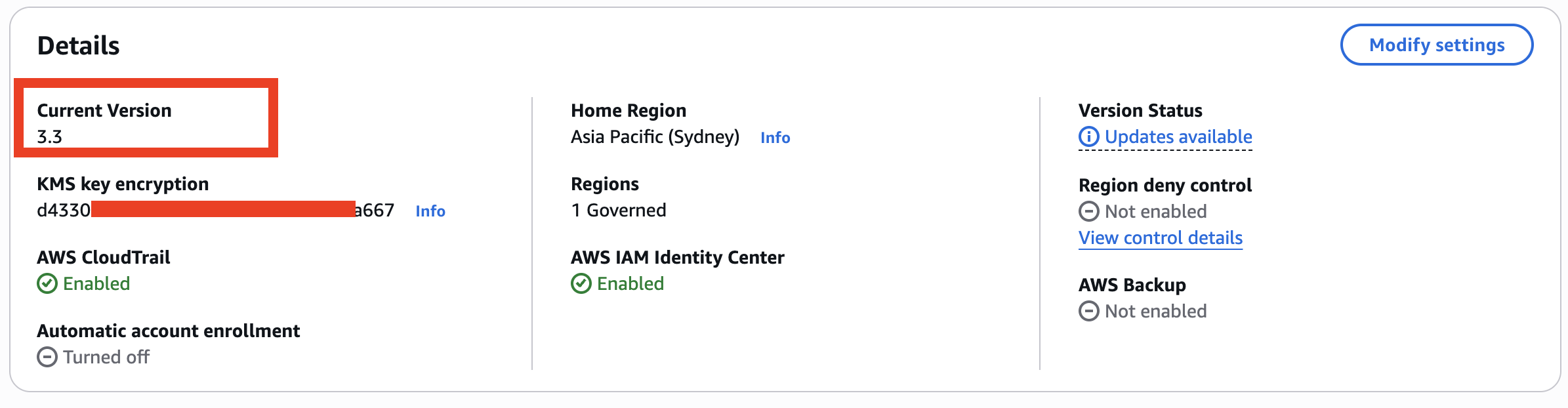
Review the landing zone version: Navigate to the Landing Zone settings page and verify your current version.
-
Check for drift: On the Landing Zone settings page, verify that your landing zone shows "No drift detected". If drift is detected, resolve it before proceeding. Accounts that are already in a drifted state before the upgrade may remain drifted after the upgrade and after OU re-registration, potentially requiring an AWS Support case to resolve.
-
Review enabled service integrations: Note which service integrations are currently enabled (AWS Config, AWS CloudTrail, AWS IAM Identity Center, AWS Backup).
Step 2: Initiate the upgrade
You can upgrade to Landing Zone 4.0 using either the AWS Control Tower console or the AWS CLI/API.
Upgrade via console
-
Navigate to Landing Zone settings in the AWS Control Tower console.
-
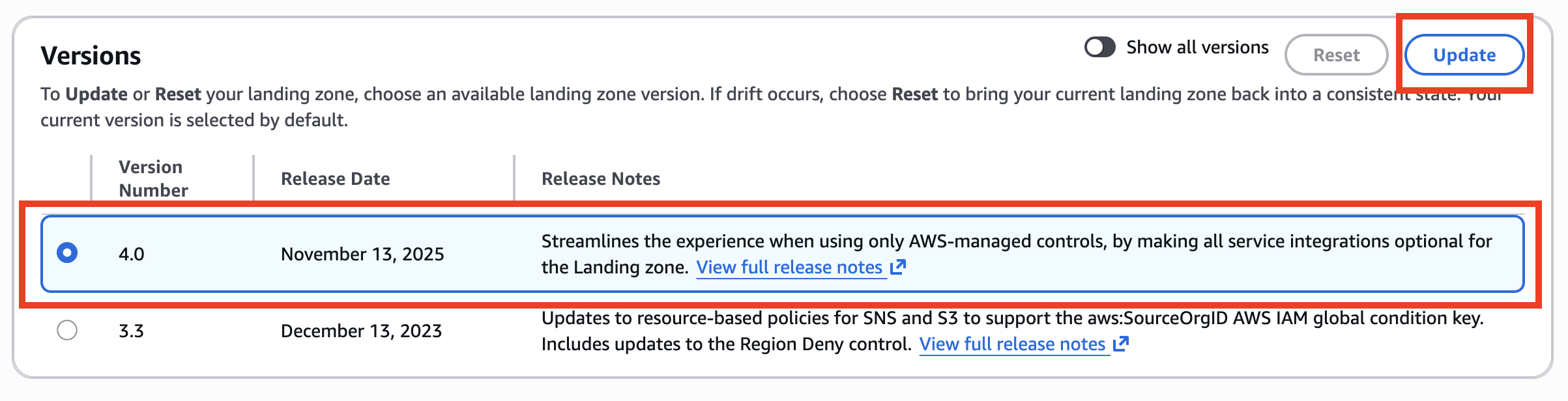
Select the Landing Zone version 4.0 and Click "Update" button to begin the upgrade process.
-
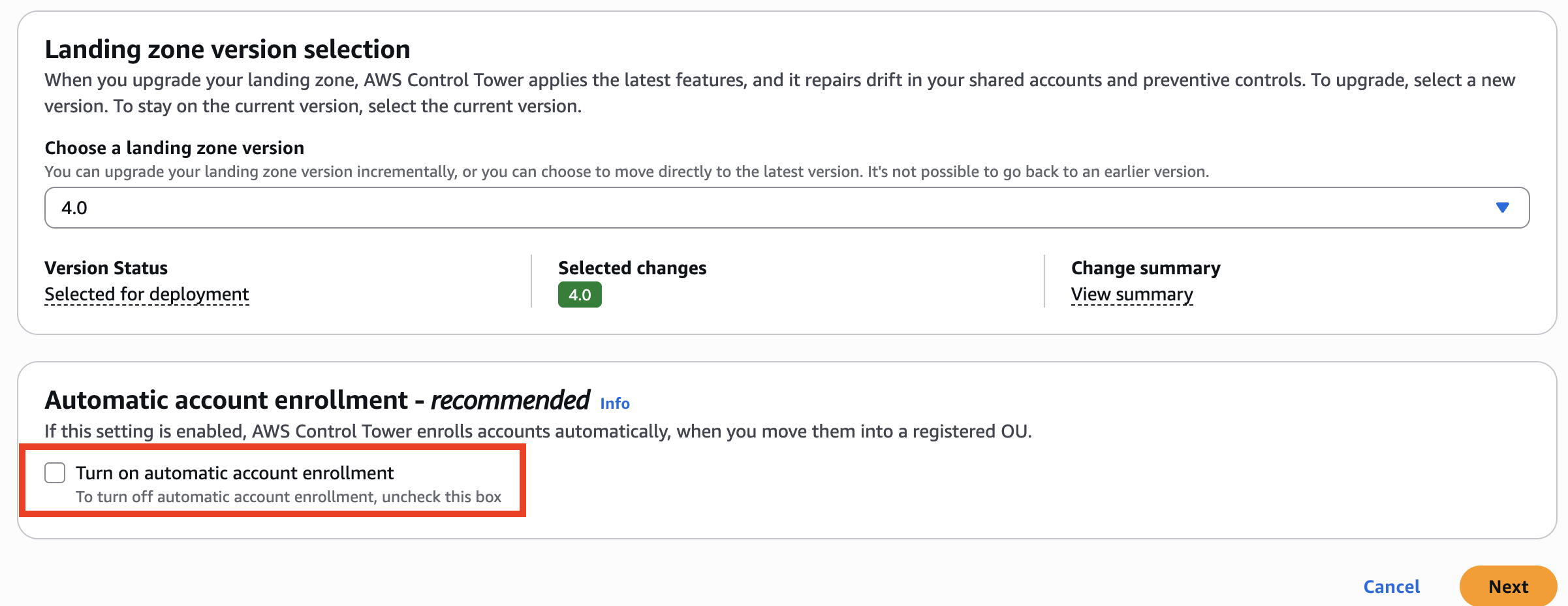
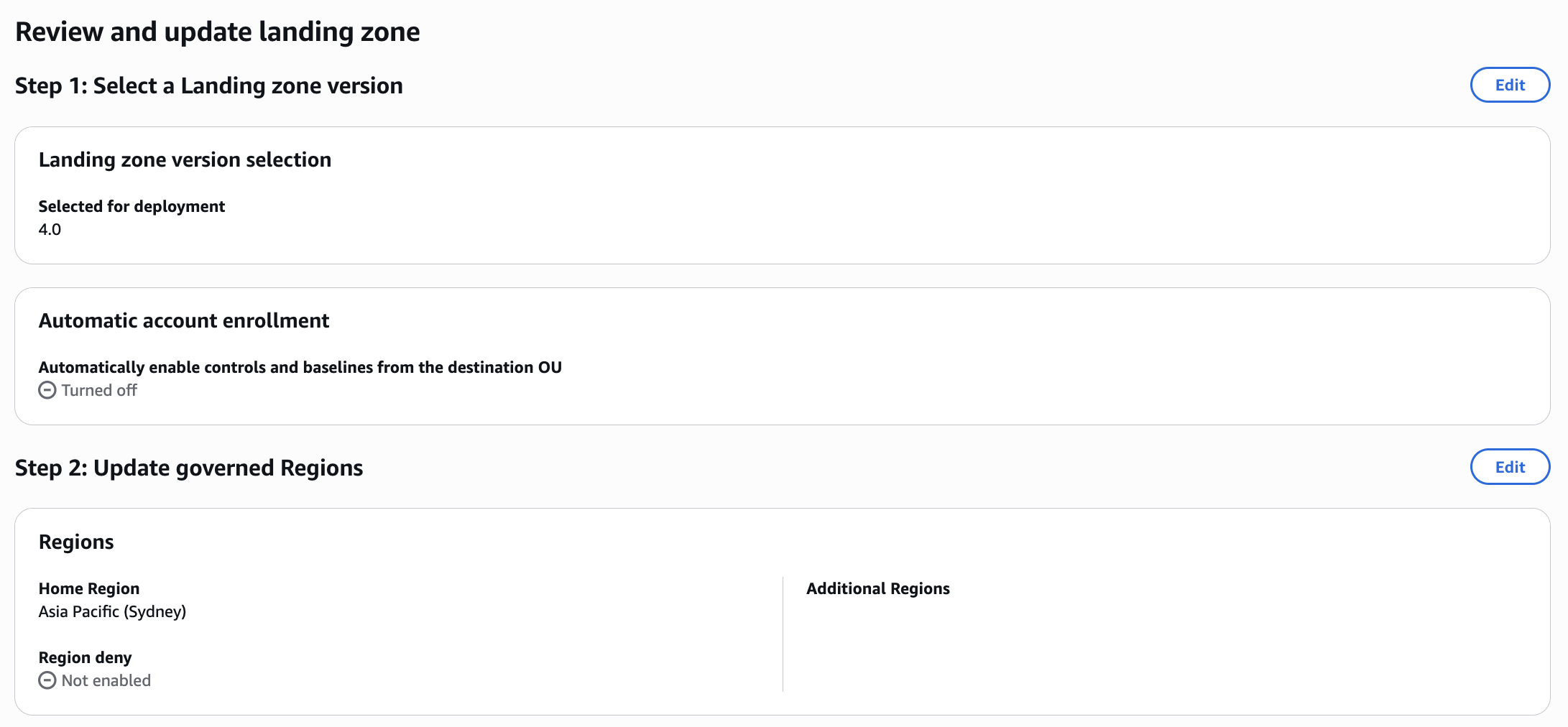
On the next page, confirm Landing zone version 4.0 is selected and optionally configure automatic account enrollment. Please note that after upgrade, it is not possible to go back to the previous version. Click Next.
-
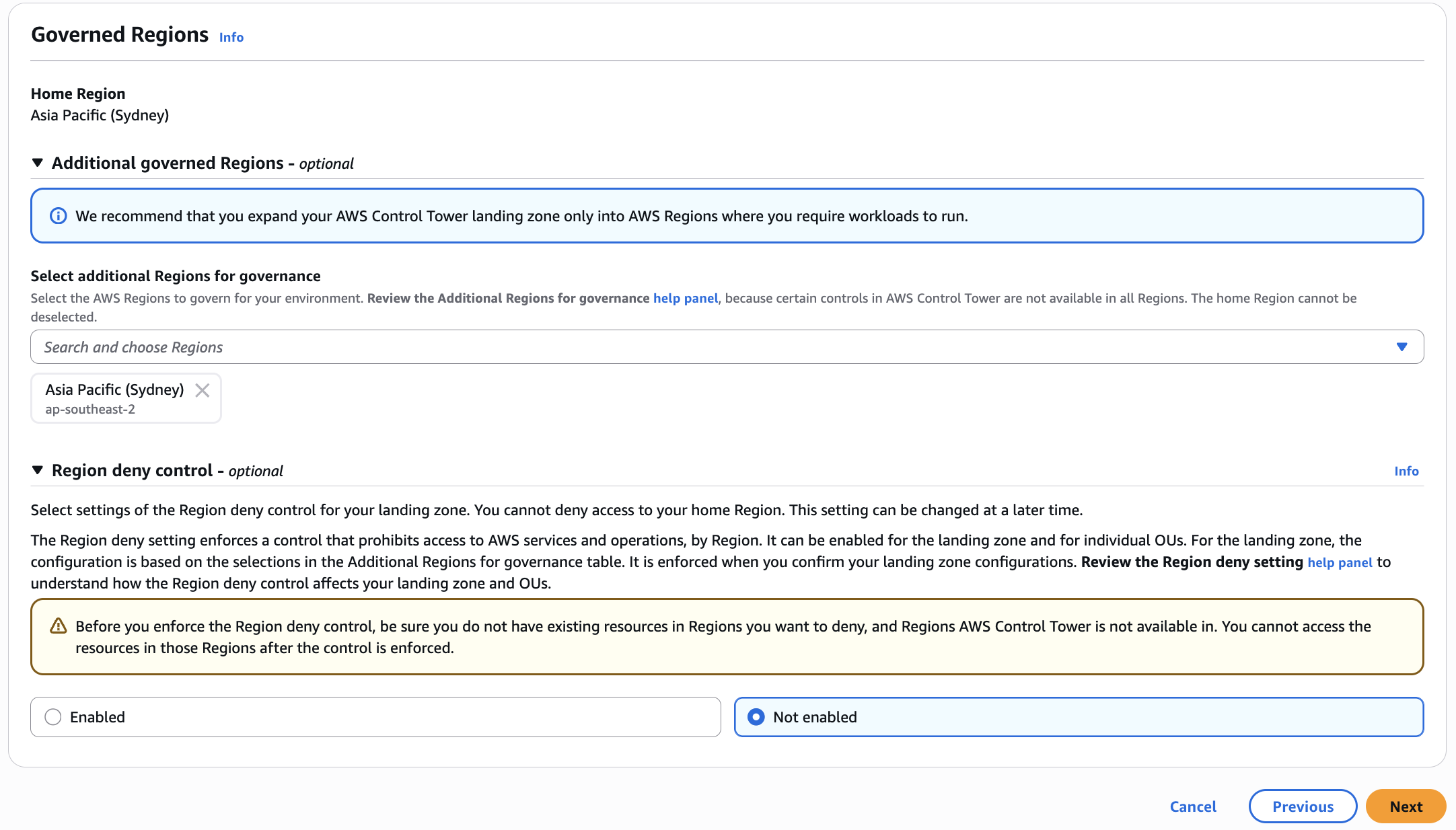
Review your Governed Regions and Region deny control settings, then click Next
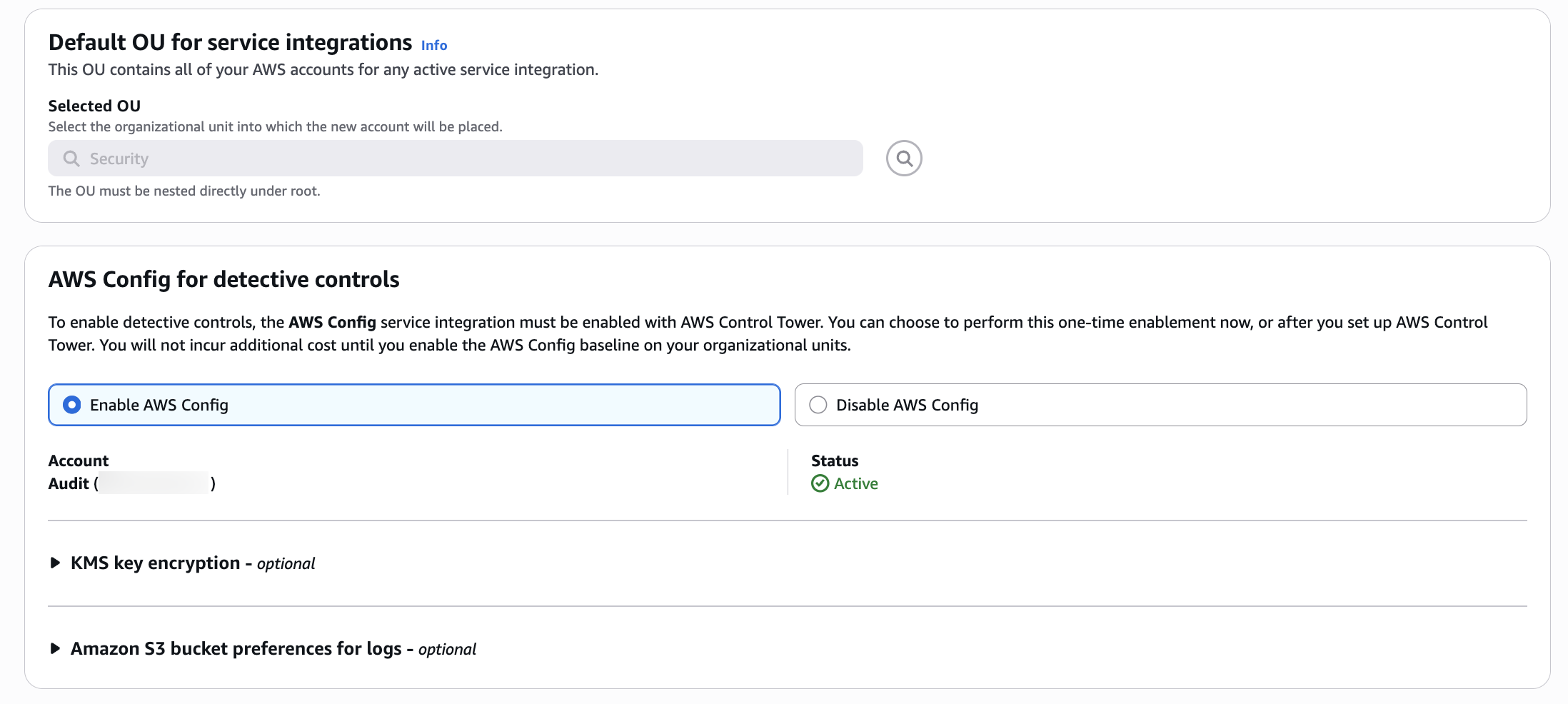
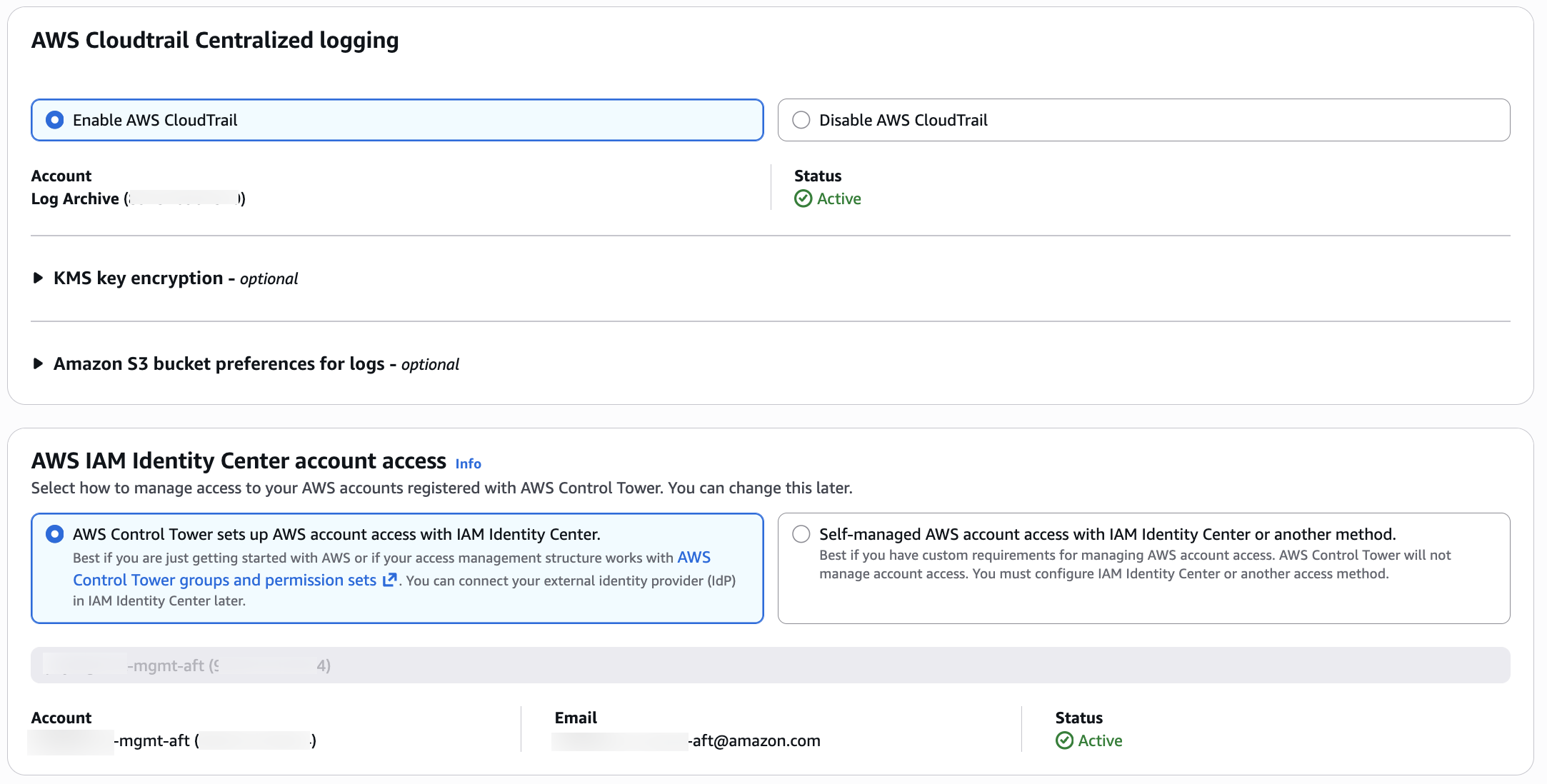
 5. This is the page where you can update "Service Integrations", then click Next
 5. Review the Landing Zone settings and then confirm the upgrade: Click "Update landing zone" to begin the upgrade process.
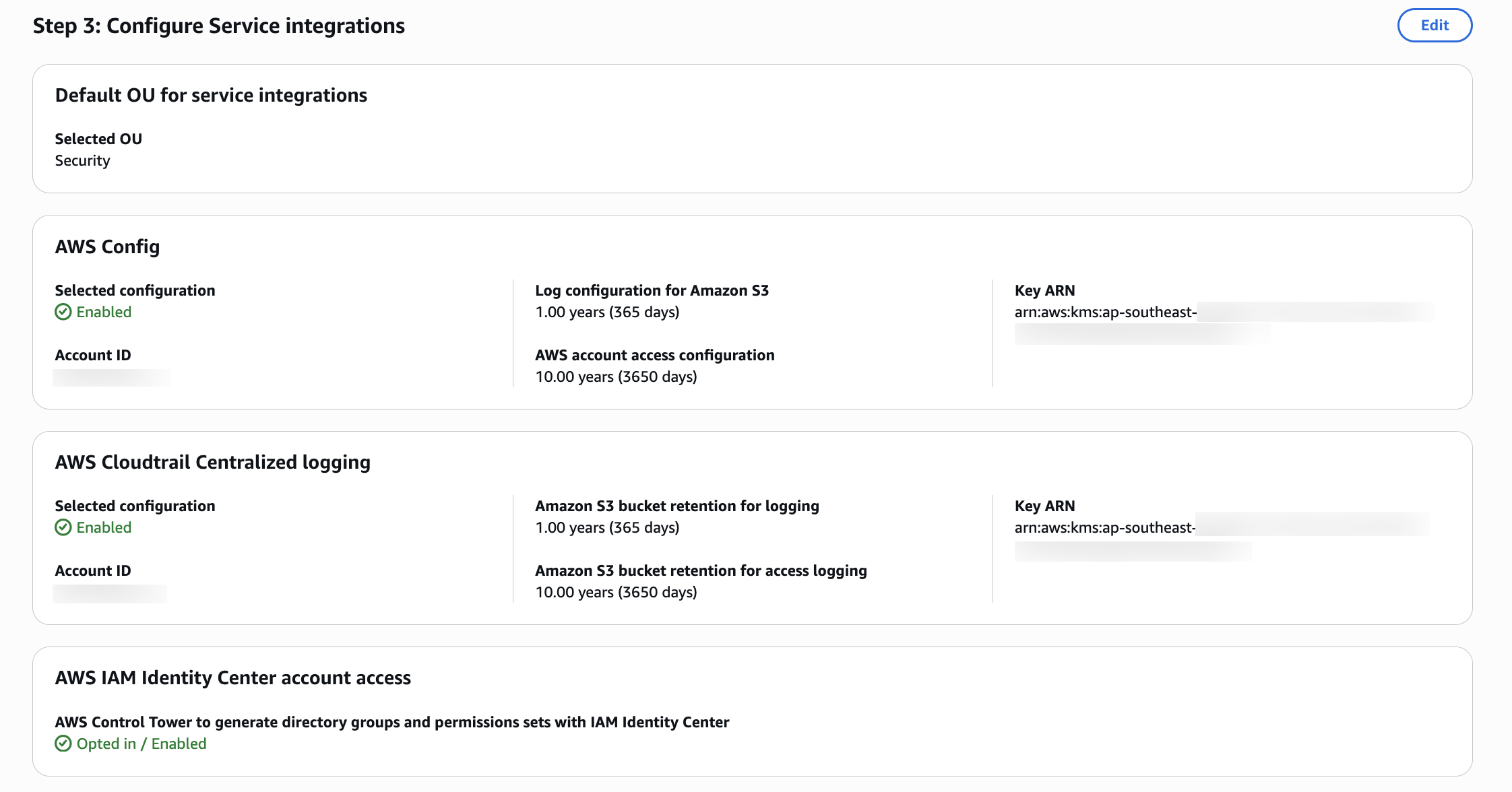
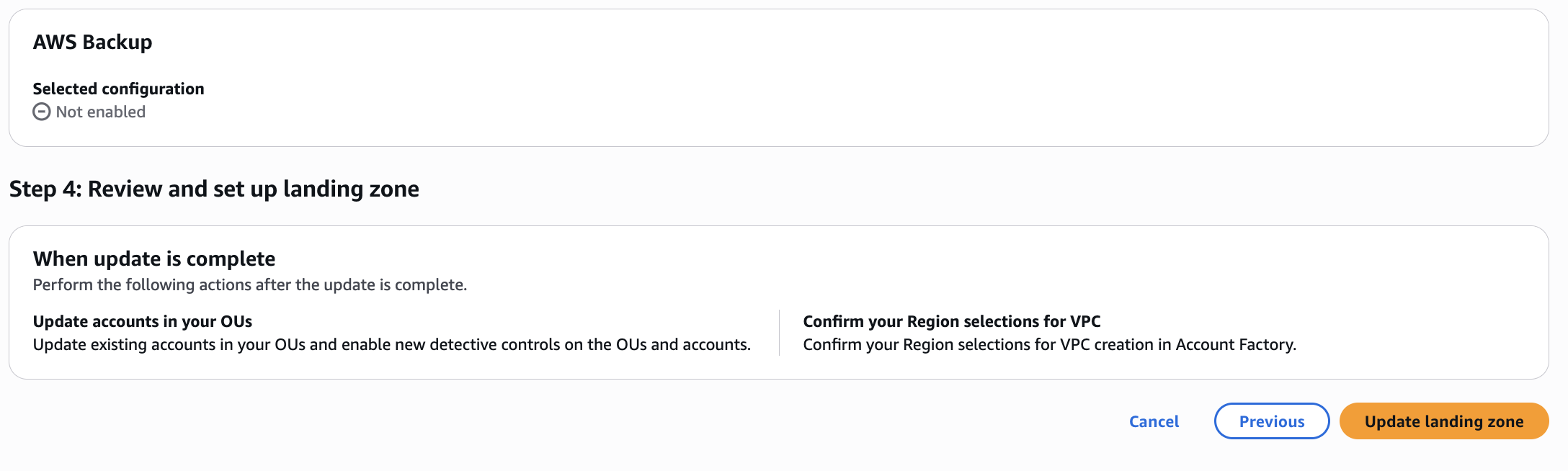 6. Monitor the upgrade progress: The upgrade process typically takes 30-60 minutes. You can monitor progress in the AWS Control Tower console.
Step 3: Verify the upgrade completion
-
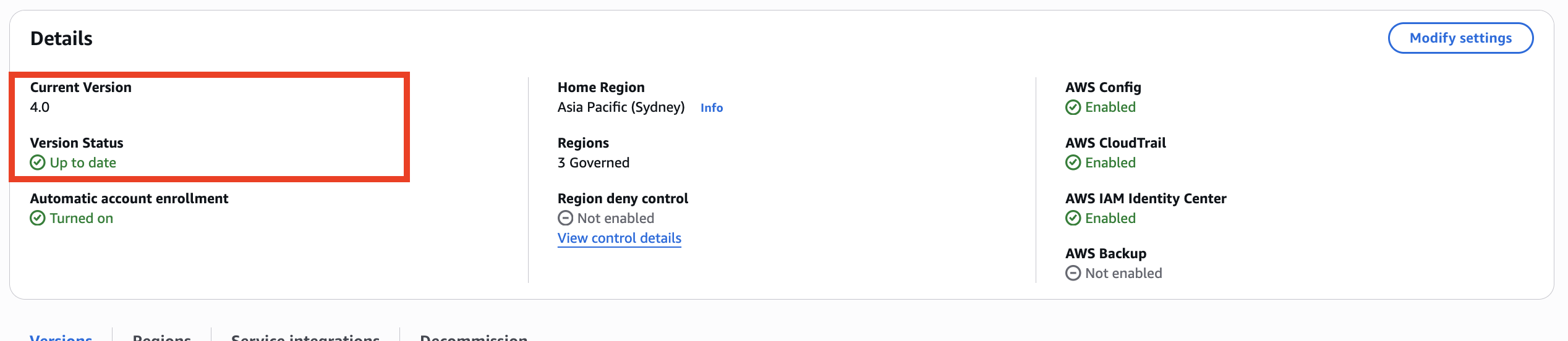
Check landing zone status: In the AWS Control Tower console, verify that the landing zone status shows "Active" and the version shows "4.0".
-
Review service integrations: Confirm that all previously enabled service integrations remain enabled and functional.
-
Check for any upgrade errors: Review the AWS Control Tower console for any error messages or warnings.
Step 4: Verify new Config baseline
- New
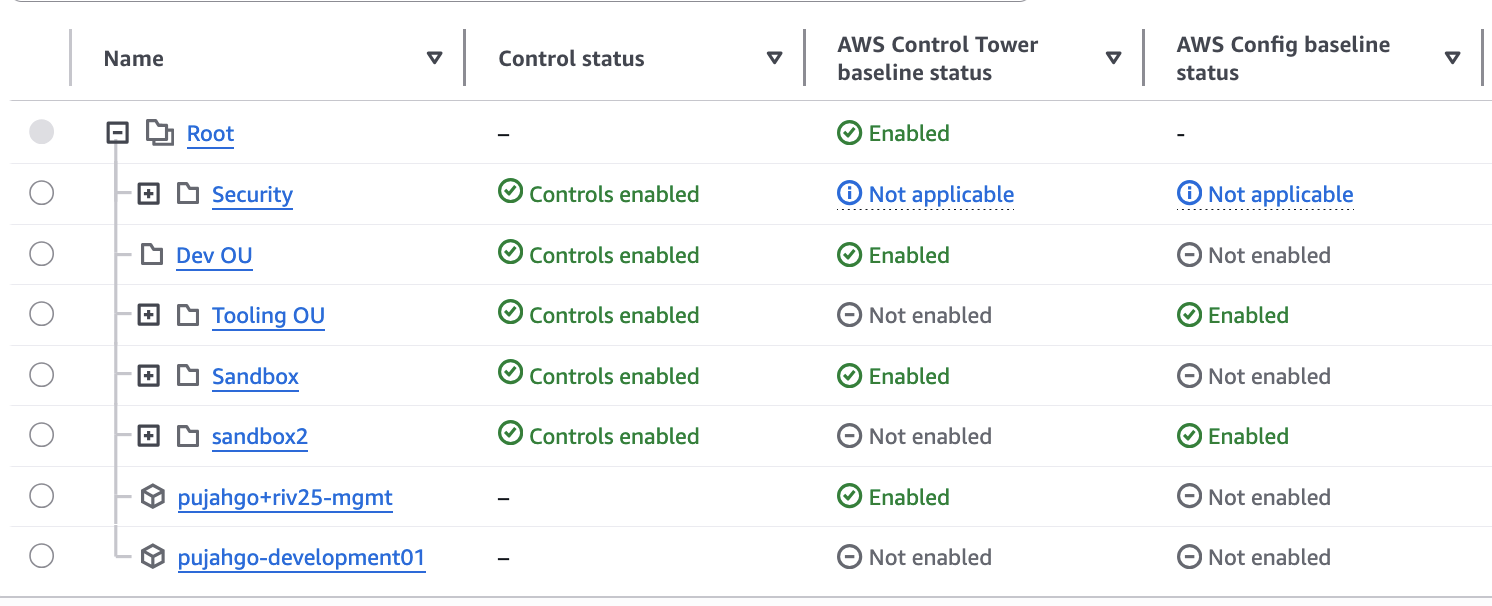
ConfigBaselinebaseline: There is now a separateConfigBaselineat the OU level for detective controls support without requiring the comprehensiveAWSControlTowerBaseline. See list of baseline types at the OU level for more information. For existing customers that are using the default landing zone, all service integrations are now optional, with the caveat of dependency requirements outlined in Key changes.
Step 5: Verify AWS Config changes
After upgrading to Landing Zone 4.0, AWS Config undergoes significant architectural changes. Follow these verification steps:
Verify delegated administrator registration
Confirm that the Audit account is registered as the AWS Config delegated administrator:
# Check delegated administrator for AWS Config
aws organizations list-delegated-administrators \
  --service-principal config.amazonaws.com \
  --region <your-home-region>
Expected output should show your Audit account ID.
Verify Service-Linked Config Aggregator
Confirm that the Service-Linked Config Aggregator (SLCA) exists in your Audit account. The new aggregator is named aws-controltower-ConfigAggregatorForOrganizations and is deployed in the audit account (as opposed to the legacy aggregator of the same name which resided in the management account):
# Describe configuration aggregators in Audit account
aws configservice describe-configuration-aggregators \
  --region <your-home-region>
You should see the aggregator aws-controltower-ConfigAggregatorForOrganizations in the audit account. Note that while this shares the same name as the legacy aggregator that was in the management account, it is a different resource deployed in a different account.

Verify old aggregators are removed
Confirm that the legacy aggregators have been removed:
- In the management account, verify that
aws-controltower-ConfigAggregatorForOrganizationsno longer exists - In the Audit account, verify that
aws-controltower-GuardRailsComplianceAggregatorno longer exists
# In the management account - check for old aggregator (should return empty or not found)
aws configservice describe-configuration-aggregators \
  --region <your-home-region>
Review custom Config aggregators If you have custom AWS Config aggregators outside AWS Control Tower naming conventions, verify they continue to function. AWS Control Tower only manages aggregators with specific naming patterns. Custom aggregators are not affected and can run in parallel with the new SLCA.
Verify custom Config query migration
If you had custom AWS Config advanced queries in the management account that ran against the old organization-level aggregator, these queries can now only run locally in the management account (not cross-account). To run cross-account queries, recreate them in the audit account where the new aws-controltower-ConfigAggregatorForOrganizations aggregator resides.
# In the Audit account - verify the new aggregator shows all member accounts
aws configservice describe-configuration-aggregator-sources-status \
  --configuration-aggregator-name aws-controltower-ConfigAggregatorForOrganizations \
  --region <your-home-region>
Verify new S3 bucket creation
Confirm that the new dedicated AWS Config S3 bucket exists in the Audit account:
# List S3 buckets in Audit account
aws s3 ls | grep aws-controltower-config-logs
Expected bucket naming pattern: aws-controltower-config-logs-<AUDIT_ACCOUNT>-<REGION_STRING>-<SUFFIX_STRING>

Note: Config data from member accounts may take up to 24 hours to appear in the new S3 bucket after the upgrade. Dashboards and compliance tools reading from S3 will show stale data during this window. For near-real-time data access, use the Config Aggregator API.
Verify CloudTrail bucket unchanged
Confirm that AWS CloudTrail continues using the existing bucket in the Log Archive account:
# List S3 buckets in Log Archive account
aws s3 ls | grep aws-controltower-logs
Expected bucket naming pattern: aws-controltower-logs-<LOGGING_ACCOUNT>-<HOME_REGION>
Test data flow by checking for recent timestamps:
# Check recent CloudTrail logs
aws s3 ls s3://aws-controltower-logs-<LOGGING_ACCOUNT>-<HOME_REGION>/ --recursive | tail -20
Verify Config delivery channels
Check that AWS Config delivery channels in all enrolled accounts point to the new S3 bucket:
# Describe delivery channels
aws configservice describe-delivery-channels \
  --region <your-home-region>
The s3BucketName should reference the new aws-controltower-config-logs-* bucket.

If you have enrolled accounts with pre-existing Config delivery channels not created by Control Tower, you must manually update them to point to the new bucket:
# Update pre-existing delivery channels to new bucket
aws configservice put-delivery-channel \
  --delivery-channel name=<CHANNEL_NAME>,s3BucketName=aws-controltower-config-logs-<AUDIT_ACCOUNT>-<REGION>-<SUFFIX>
Verify SLCA data aggregation
Allow 24-48 hours for full data aggregation after the upgrade completes. Then verify that the new Service-Linked Config Aggregator can aggregate data from all AWS Config recorders in the organization, including non-AWS Control Tower managed accounts:
# Get aggregated compliance summary
aws configservice get-aggregate-compliance-details-by-config-rule \
  --configuration-aggregator-name aws-controltower-ConfigAggregatorForOrganizations \
  --config-rule-name <any-config-rule-name> \
  --account-id <test-account-id> \
  --aws-region <region> \
  --region <your-home-region>
Verify downstream dashboards and tools
After Config data begins flowing to the new bucket (up to 24 hours), verify that all dependent dashboards and tools are receiving fresh data:
- Tag compliance dashboards
- Patch compliance dashboards
- SIEM integrations
- Any custom compliance reporting tools
Dashboards that still reference the old aws-controltower-logs-* bucket will show stale data from before the upgrade. Update them to point to the new aws-controltower-config-logs-* bucket, or preferably refactor them to use the Config Aggregator API.
Step 6: Verify AWS CloudTrail changes
AWS CloudTrail undergoes minimal changes in Landing Zone 4.0, but you should verify the following:
Verify IAM role policy update
If you upgraded via API, confirm that AWSControlTowerCloudTrailRole uses the new managed policy:
# List attached policies for CloudTrail role
aws iam list-attached-role-policies \
  --role-name AWSControlTowerCloudTrailRole
Expected output should include AWSControlTowerCloudTrailRolePolicy.
Verify CloudTrail logging continues
Confirm that the organization trail continues logging:
# Describe trails
aws cloudtrail describe-trails \
  --region <your-home-region>
Verify that the trail status is active and logging to the expected S3 bucket.
Step 7: Verify SNS topic changes
Landing Zone 4.0 introduces dedicated SNS topics for each service integration. Verify the SNS topics in the Audit account:
# List SNS topics in Audit account
aws sns list-topics --region <your-home-region>
Expected SNS topics in the Audit account:
aws-controltower-AllConfigNotifications- Still receives AWS Config eventsaws-controltower-AggregateSecurityNotifications- Still exists but only for non-drift notificationsaws-controltower-AggregateConfigurationNotifications- Continues to work for compliance notifications
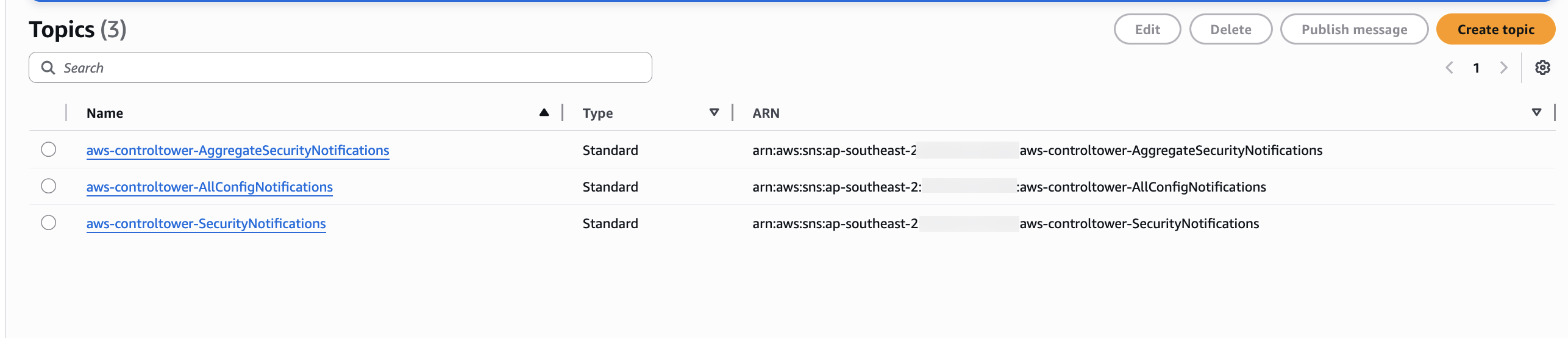
For customers upgrading with AWSControlTowerBaseline enabled, the existing SNS topics and their subscriptions in the audit account are preserved and continue working unchanged. The primary change is for customers who later disable AWSControlTowerBaseline — in that case, drift notifications move from Amazon SNS to Amazon EventBridge in the management account.
Note: Some existing SNS topics (such as
aws-controltower-AggregateSecurityNotifications) may have no active subscribers. This is expected and mirrors pre-upgrade behavior — these topics act as placeholders and do not indicate a problem.
Review all SNS topic subscriptions, especially HTTPS endpoints for third-party integrations (ServiceNow, PagerDuty, etc.), to confirm they continue to receive notifications post-upgrade.
Step 8: Verify control changes
With AWS Control Tower Landing Zone 4.0, there have been several changes to mandatory controls. To verify the changes follow the documentation Changes in Landing Zone 4.0 controls
Re-register organizational units
After upgrading to Landing Zone 4.0, you should re-register your OUs to apply the new baseline versions to member accounts. This is an incremental process that can be done in phases.
Understanding OU re-registration
When AWS Control Tower is updated to version 4.0, OU re-registration becomes necessary due to new baseline dependencies Structure. Please see the documentation on the [[compatibility of baselines with AWS Control Tower landing zone versions.]]
When you re-register an OU:
- AWS Control Tower updates all member accounts within that OU with the new baseline version
- Control Tower-managed SCPs are temporarily inactive while being refreshed (typically minutes)
- Custom SCPs remain enforced and are not impacted
- Workloads continue running without interruption
- You can process up to 1,000 accounts per OU in a single batch
Important: Re-registering a parent OU does not cascade to child OUs. Each OU in the hierarchy must be re-registered individually. Plan to re-register each child OU separately, starting from top-level OUs and working down. This can add significant time to the rollout if you have a deep OU hierarchy.
Phased rollout strategy
Recommended approach:
- Hierarchical enablement: Start with top-level OUs before proceeding to child OUs. Remember that each child OU must be re-registered separately — it does not cascade.
- Mixed baseline versions: Acceptable during transition periods (hybrid 3.x and 4.0)
- Batch processing: Use "Re-register OU" to update all accounts within an OU (up to 1,000 accounts per batch)
- Monitor each OU: Verify successful re-registration before proceeding to the next OU
Re-register an OU via console
- Navigate to the OU page in the AWS Control Tower console
- Select the OU you want to re-register
- Click Re-register OU
- Review the accounts that will be updated
- Click Re-register OU to confirm
- Monitor the re-registration progress in the console
Note: After migration, you may need to manually re-register certain OUs to deploy new baseline versions. This is expected behavior and ensures you have control over when baseline updates are applied.
Troubleshooting: If an account was already in a drifted state before the upgrade, it may remain drifted after re-registration. In this case, open a support case with AWS Support in the affected account to investigate and resolve the persistent drift.